¶ RPAC Deselection Modal
The RPAC Deselection Modal is a pop-up window that interrupts the RPAC deselection action on Bill Run invoices. When a member tries to opt out of their RPAC contribution, the modal appears on top of the invoice payment screen with a custom message from your association, giving the member a moment to reconsider before the deselection is finalized.
¶ How It Works
During dues billing, members can deselect RPAC contributions on their invoice. With the modal enabled, that deselection action triggers a pop-up before the change is applied. The member reads your message, then chooses whether to continue with the opt-out or keep the contribution in place.
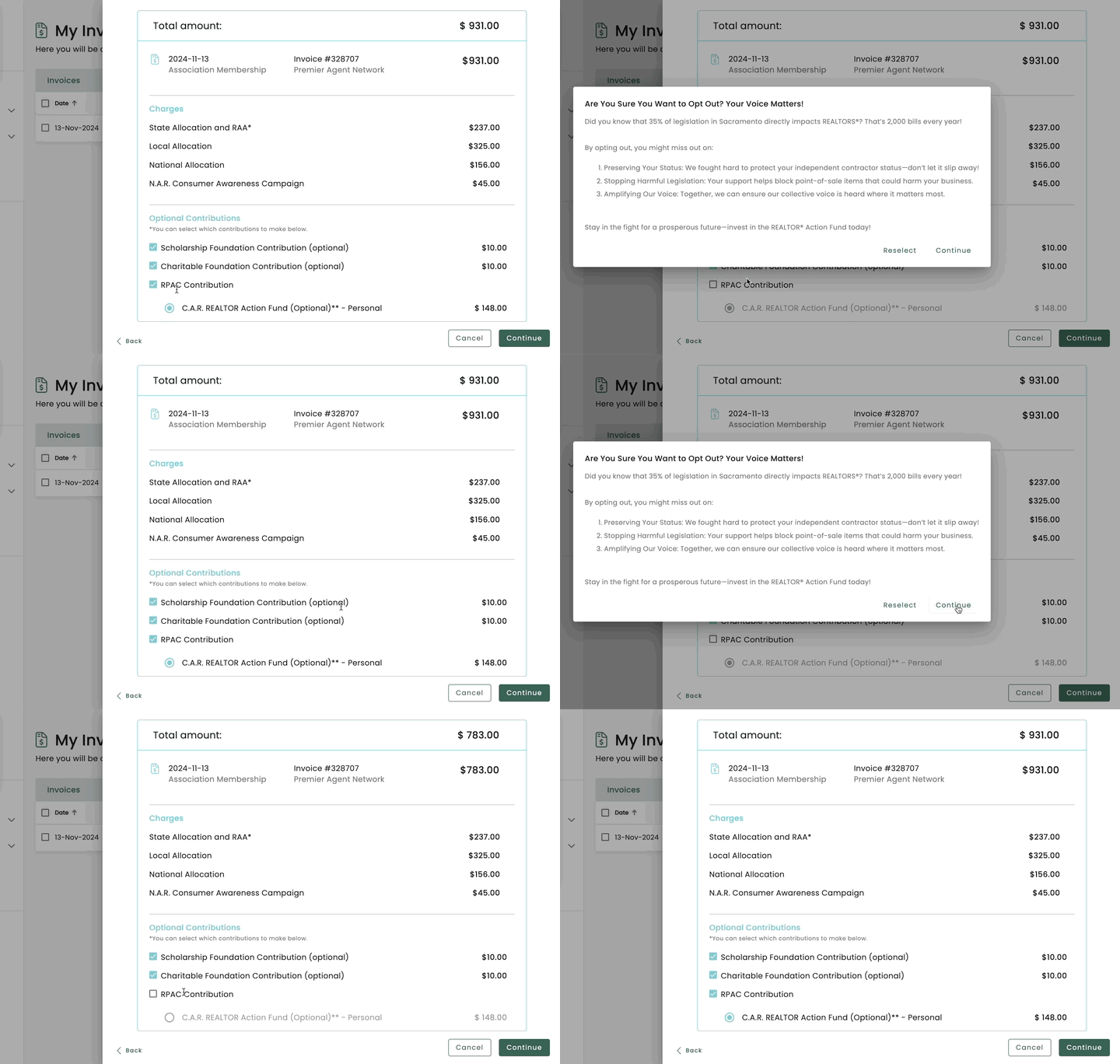
The modal runs only when a member moves to deselect. Members who leave RPAC selected never see it.
¶ Customizing Your Modal Text
Each association submits its own copy. The modal is an interruption, not a full advocacy page, so the copy should be short and direct. A strong attention-getting line, one or two sentences making the case, and a clear next step is the right scale. Long blocks of text get skimmed and lose the moment.
You can request basic formatting:
- Bold
- Italic
- Underline
- A linked URL (for example, a short video explaining your PAC's work)
¶ How to Request It
Email help@tangilla.com with:
- The exact text you want displayed in the modal
- Any formatting preferences (which words or phrases should be bold, italic, underlined, or linked)
- The destination URL for any link you want included
Once we receive your request, we will load it for your association as quickly as possible.
¶ What Good Modal Copy Looks Like
A useful structure most associations land on:
- A pattern interrupt. Something that gets the member to actually read the box rather than dismiss it. A direct question works well.
- One concrete benefit or fact. A specific win the PAC has delivered, a dollar figure, or something at stake for the member's business.
- A small ask with a way to learn more. The contribution amount and a link to a short video or page.
Example structure (replace with your association's specifics):
Wait. Are you sure you want to opt out?
Your PAC just protected [specific policy win] for members in [your state]. That is real money kept in your business this year.
It is only [contribution amount]. Watch this short video to see what your contribution funds.
¶ Foundation Opt-Out
This feature is available for RPAC only. An equivalent opt-out modal for Foundation contributions is not currently supported and is not on the roadmap for 2026 billing. We will revisit it ahead of the 2027 billing cycle. If this is something your association needs, let your Customer Success contact know so we can factor demand into that decision.
¶ Related
- Bill Run
- Invoice Payment Screen
- New Feature Announcement, November 15, 2024