¶ Corporate Structure
A visual display of the Corporate Structure which refers to the organization of different offices within a company. It will show the main office along all its branch offices

¶ Configuration
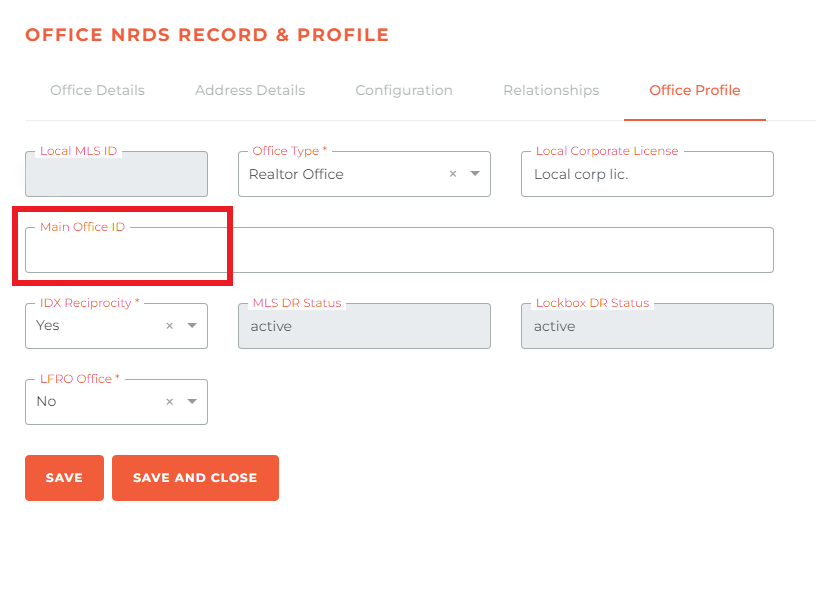
To properly use the Corporate Structure you need to configure the Main Office ID on the Office Profile.
The main office ID used no longer is the one pulled from NRDS, for more details on this check our documentation on it.
¶ Corporate Structure Data:
Office Type: Indicates the type of office, such as "Main Office" or "Active Branch."
Office NRDS: The office M1/NRDS number.
Office Name: Lists names of different offices and branches in the corporate structure.
Office Status: Shows the status.
DR Name: Displays a designated responsible individual's name. This can be unique to each office.
Office Contact Manager: Displays another person's name, or the same persons's name. This can be unique to each office.
Office MLS ID: The unique MLS office ID.
Agents Count: Indicates the number of agents associated with each office.
Active Members Count: Shows the count of currently active members.
¶ April 2022 Corporate Structure Changes
These changes made in April of 2022 impacted the way Corporate Structure is defined in Tangilla.
Historically the Corporate Structure for Offices was defined by the main_office_id and branch_type fields in the M1 Office Record. It became increasingly clear that these records could be unreliable when a Office is not Primary to your Association.
Tangilla has always held a local version of branch_type in the form of the reso_office_type and considered this the more accurate source of this infomation. From April 7 2022 Tangilla now holds a local version of main_office_id these fields are used as the source of truth for Offices in Tangilla for the purposes of Corporate Structure on or after April 18 2022.
The field Main Office ID appears under the Office Profile tab for Edit Offices (see sample below)
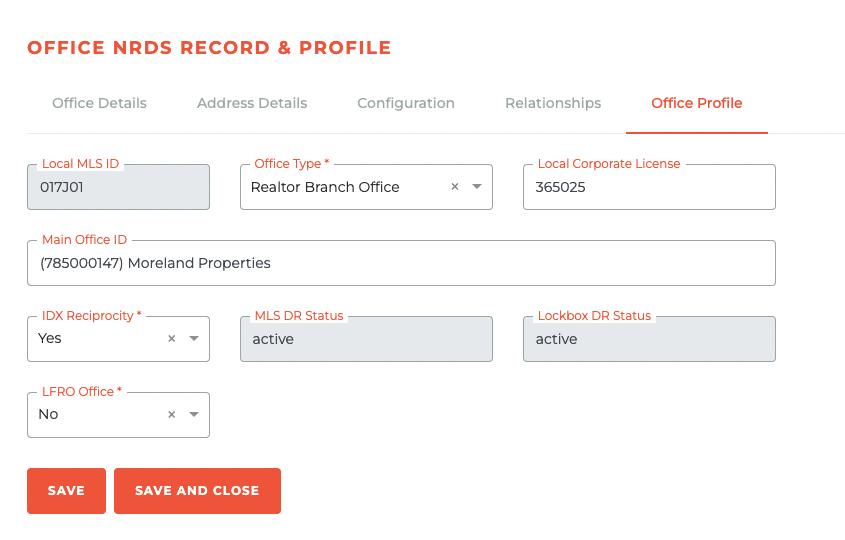
The M1 version of Main Office ID is under Relationships, however this was set to read only and where your Association is Primary for the Office, Tangilla will maintains this record on M1 for you based on the local verions of the field.
Following the completion of the transition branch_type was set to read only and where your Association is Primary for the Office, Tangilla maintains this record on M1 for you. reso_office_type of Firm is be [M]ain, reso_office_type of Branch is [B]ranch and all other reso_office_type are [S]ingle.
As part of that transition, Tangilla pre-poulated the local version of main_office_id with the data from M1. You should use the Report Offices > Corporate Structure Information from M1 to review the structure and monitor changes that you make to both main_office_id and reso_office_type.
This transition was most important for
Officesthat yourAssociationis notPrimaryfor and as a result you don't have control over.
¶ Frequently Asked Questions
| # | Question | Answer |
|---|---|---|
| 1 | What does the Corporate Structure display? | It displays a visual organization of different offices within a company, including the main office and its branch offices. |
| 2 | How do you configure the Corporate Structure in Tangilla? | You need to set the Main Office ID under the Office Profile. This ID is no longer pulled from NRDS but managed locally in Tangilla. |
| 3 | Where can I find more information about configuring the Main Office ID? | You can check the documentation linked in the Corporate Structure section for more details. |
| 4 | What information does the Corporate Structure Data include? | It includes Office Type, Office NRDS, Office Name, Office Status, DR Name, Office Contact Manager, Office MLS ID, Agents Count, and Active Members Count. |
| 5 | What changed in the Corporate Structure as of April 2022? | Tangilla began using its local versions of main_office_id and reso_office_type as the source of truth instead of relying on the M1 Office Record. |
| 6 | Why were these changes implemented? | Because M1 Office Records became unreliable when an Office wasn't Primary to the Association. Tangilla's local records are considered more accurate. |
| 7 | Where is the new Main Office ID displayed in Tangilla? | It appears under the Office Profile tab when editing offices. |
| 8 | What is the status of the M1 fields after the April 2022 transition? | The M1 Main Office ID and branch_type fields were set to read-only. Tangilla maintains these fields on M1 based on its local version when the Association is Primary for the Office. |
| 9 | How are the reso_office_type values interpreted? |
Firm is interpreted as [M]ain, Branch as [B]ranch, and all others as [S]ingle. |
| 10 | How can users monitor changes to the corporate structure? | By using the report Offices > Corporate Structure Information from M1, which helps in reviewing the structure and tracking changes made to main_office_id and reso_office_type. |
| 11 | What is the DR Name field in Corporate Structure Data? | It displays the designated responsible individual's name for each office, which can vary between offices. |
| 12 | Can the Office Contact Manager be the same as the DR Name? | Yes, it can be the same person or a different individual, depending on the office. |
| 13 | What is the significance of the Office MLS ID? | It is a unique identifier for each office within the MLS system. |
| 14 | How does the Active Members Count differ from Agents Count? | Active Members Count shows only the currently active members, while Agents Count reflects all agents associated with an office. |
| 15 | Why is the transition important for offices not Primary to your Association? | Because you don't have control over these offices on M1, having local control in Tangilla ensures accuracy and maintainability for your association's data. |